

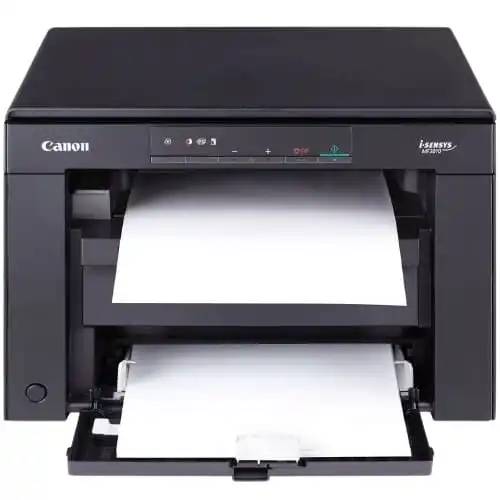
Canon I-SENSYS MF3010 MFP Laser Printer
SKU.: BC4942343
✓ In stock
Canon I-SENSYS MF3010 MFP Laser Printer
The Canon I-SENSYS MF3010 is a compact and reliable multifunction laser printer designed for home offices and small businesses. With its print, scan, and copy functions, this all-in-one machine delivers professional-quality prints at fast speeds, while maintaining energy efficiency and user-friendly operation. Its sleek design fits perfectly in any workspace without compromising performance.
✅ Key Features & Benefits
- 3-in-1 Functionality: Print, copy, and scan from one compact device.
- Fast Printing: Output speeds of up to 18 pages per minute.
- High-Quality Output: Crisp text and sharp graphics with 1200 x 600 dpi resolution.
- Compact Design: Sleek and space-saving, ideal for small desks and offices.
- Energy Efficient: Low power consumption with Canon’s Quick First-Print technology.
- Easy Operation: Simple control panel and user-friendly design.
✅ Technical Specifications
| Specification | Details |
|---|---|
| Printer Type | Monochrome Laser Multifunction Printer |
| Functions | Print, Copy, Scan |
| Print Speed | Up to 18 ppm (A4) |
| Print Resolution | 1200 x 600 dpi (enhanced) |
| Scan Resolution | Up to 600 x 600 dpi (optical) |
| Paper Handling | 150-sheet input tray, 100-sheet output |
| Processor & Memory | Canon proprietary processor, 64 MB RAM |
| Connectivity | USB 2.0 |
| Monthly Duty Cycle | Up to 8,000 pages |
| Dimensions | 372 x 276 x 254 mm |
| Weight | Approx. 8 kg |
✅ Ideal Uses
- Home Offices: Compact printer for everyday printing and scanning needs.
- Small Businesses: Reliable performance for low to medium-volume printing.
- Students & Professionals: Perfect for assignments, reports, and document scanning.
✅ Why Choose the Canon I-SENSYS MF3010?
- All-in-One Efficiency: Combines printing, scanning, and copying in one device.
- Compact & Stylish: Saves space while delivering professional performance.
- Quick First Print: Reduces warm-up time for instant printing.
- Trusted Canon Technology: High-quality prints with proven reliability.
✅ Businessclaud Guarantee – Buy with Confidence
- 2-Year Warranty: Protection on parts and performance.
- Free 24-Hour Delivery: Fast shipping anywhere in Kenya.
- Best Value Deal: High performance at an affordable price.
✅ Order Now
Choose the Canon I-SENSYS MF3010 MFP Laser Printer today from Businessclaud and enjoy fast, reliable, and high-quality printing with free delivery and full warranty coverage.
Canon I-SENSYS MF3010 All-In-One Mono Laser Printer FAQs
1. What is the Canon I-SENSYS MF3010?
The Canon I-SENSYS MF3010 is a compact mono laser multifunction printer offering print, scan, and copy functions. It is designed for home users or small offices needing reliable, high-quality monochrome output at low running cost. :contentReference[oaicite:0]{index=0}
2. What is the print speed?
➤ Up to 18 ppm (pages per minute) for A4 monochrome printing. :contentReference[oaicite:1]{index=1}
3. What print resolution does it support?
➤ Standard resolution: 600 × 400 dpi
➤ Enhanced print quality: up to 1200 × 600 dpi with Canon’s Automatic Image Refinement. :contentReference[oaicite:2]{index=2}
4. How long does it take for the first page to come out?
➤ First Print Out Time (from ready): about 7.8 seconds. :contentReference[oaicite:3]{index=3}
5. What are the copy specifications?
➤ Copy Speed: up to 18 ppm (A4)
➤ First Copy Out Time: approx 12 seconds
➤ Copy Resolution: up to 600 × 600 dpi
➤ Various modes: Text, Text/Photo, Photo, ID-Card copy, 2-on-1 layout. :contentReference[oaicite:4]{index=4}
6. What are the scanning features?
➤ Flatbed colour scanner
➤ Optical scan resolution: up to 600 × 600 dpi
➤ Enhanced scan resolution: up to 9600 × 9600 dpi for software interpolation
➤ Supports colour depth 24-bit input/output and greyscale with 256 levels. :contentReference[oaicite:5]{index=5}
7. What paper handling capabilities does it have?
➤ Standard input tray capacity: 150 sheets
➤ Output bin: ~100 sheets
➤ Supported media types: plain, heavy, recycled paper, envelopes, labels, transparency.
➤ Supported paper weights: approx 60–163 g/m². :contentReference[oaicite:6]{index=6}
8. What media sizes are supported?
Sizes include A4, B5, A5, LTR (Letter), LGL (Legal), Executive, common envelope sizes (DL, Monarch, COM10), plus custom sizes from approx width 76 mm to 216 mm, length 127 mm to 356 mm. :contentReference[oaicite:7]{index=7}
9. What is the duty cycle and recommended use?
➤ Maximum duty cycle: approx 8,000 pages/month
➤ Best suited for moderate volume printing in a home or small office environment. :contentReference[oaicite:8]{index=8}
10. What are the dimensions, weight & power requirements?
➤ Dimensions: approx 372 × 276 × 254 mm (W × D × H)
➤ Weight: ~8.2 kg
➤ Power Source: 220-240 V, 50/60 Hz
➤ Power consumption: Sleep mode ~1.4 W; TEC approx 0.6 kWh. :contentReference[oaicite:9]{index=9}
11. What connectivity options are available?
➤ USB 2.0 Hi-Speed interface
➤ No built-in WiFi or network connectivity in standard model.
➤ No duplex (automatic two-sided) printing. :contentReference[oaicite:10]{index=10}
12. What cartridges does the MF3010 use and what is yield?
➤ Uses Canon 725 all-in-one cartridge combining toner, drum, and cleaning units
➤ Page yield approx 1,600 pages (for standard coverage) per cartridge. :contentReference[oaicite:11]{index=11}
13. How energy efficient is it?
➤ Sleep mode consumption ~1.4 W
➤ Typical Electricity Consumption (TEC): ~0.6 kWh
➤ Toner-Saver mode included. :contentReference[oaicite:12]{index=12}
14. What are noise levels during operation?
➤ Sound Power (Active): up to ~65.3 dB(A)
➤ Standby: ~43.0 dB(A)
➤ Sound Pressure (Active): ~50.4 dB(A)
➤ Standby/power-off quieter / inaudible. :contentReference[oaicite:13]{index=13}
15. What operating systems are supported?
Compatible with Windows (7, 8.1, 10, 11), macOS, and Linux using driver software. TWAIN/WIA scanning support for PCs. :contentReference[oaicite:14]{index=14}
16. How do I maintain this printer well?
➤ Use authentic Canon 725 cartridges
➤ Keep paper tray clean and avoid loading over capacity
➤ Run cleaning of drum when needed
➤ Avoid letting toner reach extremely low levels
➤ Keep printer on flat, stable surface and in moderate environmental conditions (10-30 °C, moderate humidity)
➤ Update firmware/driver when available
17. What is Businessclaud’s delivery and warranty policy?
Businessclaud offers:
➤ Free delivery within 24-hours anywhere in Kenya
➤ 2-year warranty on all Canon printers
➤ Support via phone 0101001101 or email [email protected]
18. Where can I buy the Canon MF3010 in Kenya?
You can purchase it from Businessclaud Limited with full support and service. Free 24-hour delivery, genuine Canon products, and 2-year warranty included. Contact via 0101001101 or [email protected]
19. Who is this printer best suited for?
This printer is ideal for personal users, small offices, students & home offices who need reliable mono document printing, occasional scanning and copying, and want low upfront and running cost. It works great for letters, reports, invoices, school assignments.
20. Why choose MF3010 from Businessclaud?
Because Businessclaud guarantees:
➤ Authentic Canon MF3010 printer with genuine consumables
➤ Competitive pricing and value for money
➤ Free delivery in 24 hours nation-wide
➤ Reliable after-sales support & parts via phone 0101001101 or email [email protected]
🎯 Order Now! Click "Add to Cart" and experience the power of
Canon I-SENSYS MF3010 MFP Laser Printer!
Or check out our Canon Printers
to complete your shopping experience!
| Stars | Percentage |
|---|---|