

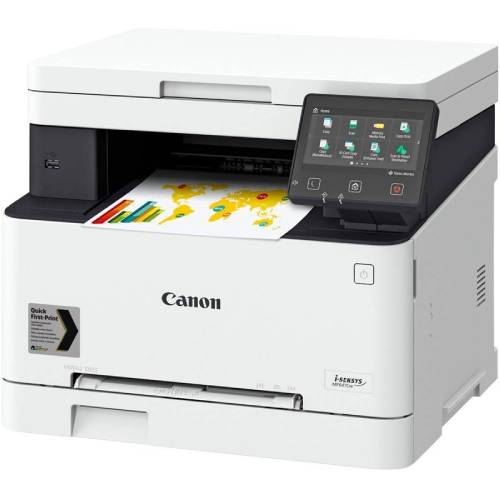
Canon MF651CW ISENSYS MFP Printer
SKU.: BC4942347
✓ In stock
Canon MF651CW ISENSYS MFP Printer
Canon MF651CW ISENSYS MFP Printer is a reliable all-in-one color laser printer designed for small offices and home businesses. Offering printing, scanning, copying, and cloud connectivity, this multifunction printer delivers professional-quality results with ease. Compact, efficient, and user-friendly, it ensures high productivity while keeping running costs low.
✅ Key Features & Benefits
- All-in-One Functionality: Print, copy, and scan from a single device.
- High-Quality Printing: Produces sharp text and vibrant color prints.
- Wireless Connectivity: Supports Wi-Fi, USB, and mobile printing.
- Compact Design: Space-saving build ideal for small offices.
- Energy Efficient: Low power consumption with Canon’s eco-friendly technology.
- Fast Printing Speed: Handles bulk jobs efficiently without sacrificing quality.
✅ Technical Specifications
| Specification | Details |
|---|---|
| Brand | Canon |
| Model | MF651CW ISENSYS MFP |
| Functions | Print, Copy, Scan |
| Print Speed | Up to 18 pages per minute (A4) |
| Resolution | Up to 1200 x 1200 dpi |
| Connectivity | USB, Wi-Fi, Mobile Printing (AirPrint, Mopria, Canon PRINT Business) |
| Paper Handling | 250-sheet input tray |
| Display | 5-inch Color Touchscreen |
| Monthly Duty Cycle | Up to 30,000 pages |
| Dimensions | 451 x 460 x 360 mm |
| Weight | Approx. 18.9 kg |
✅ Ideal Uses
- Small Businesses: Perfect for everyday office printing, scanning, and copying needs.
- Home Offices: Reliable multifunction printer for personal and work use.
- Schools & Institutions: Great for administrative and document management tasks.
- Remote Work: Wireless printing and scanning for flexible productivity.
✅ Why Choose Canon MF651CW ISENSYS?
- Professional Quality: Crisp, clear, and vibrant print results.
- Time-Saving: Fast printing speeds with easy touchscreen controls.
- Eco-Friendly: Energy-efficient operation with Canon’s green technology.
- Wireless Flexibility: Print directly from smartphones, tablets, and laptops.
✅ Businessclaud Guarantee – Buy with Confidence
- 2-Year Warranty: Full protection against defects and performance issues.
- Free 24-Hour Delivery: Across Kenya for fast and reliable service.
- Best Price Assurance: Premium multifunction printer at a competitive price.
✅ Order Now
Get the Canon MF651CW ISENSYS MFP Printer today from Businessclaud and enjoy reliable, high-quality, and efficient multifunction printing. With free 24-hour delivery and a 2-year warranty, it’s the smart choice for your office or home workspace.
Canon i-SENSYS MF651CW Colour Laser All-in-One Printer FAQs
1. What is the Canon i-SENSYS MF651CW?
The Canon i-SENSYS MF651CW is a colour laser multifunction printer offering Print, Scan & Copy, designed for small & medium offices. It features wireless, Ethernet, and USB connectivity with a smart touch interface. :contentReference[oaicite:1]{index=1}
2. What is the print speed?
➤ Single-sided A4 printing: up to 18 ppm in both colour and black/white. :contentReference[oaicite:2]{index=2}
➤ For A5 in Landscape orientation: up to 38 ppm. :contentReference[oaicite:3]{index=3}
3. What is the print resolution?
Up to 1200 × 1200 dpi for both colour and mono prints. :contentReference[oaicite:4]{index=4}
4. How quickly does it warm up and print the first page?
➤ Warm-up time: approx 13 seconds or less from power on. :contentReference[oaicite:5]{index=5}
➤ First print-out time: ≈ 10.5 seconds (colour) / ≈ 10.4 seconds (mono). :contentReference[oaicite:6]{index=6}
5. What are the scanning capabilities?
➤ Optical scan resolution: up to 600 × 600 dpi. :contentReference[oaicite:7]{index=7}
➤ Enhanced/interpolated resolution: up to 9600 × 9600 dpi for detail in images. :contentReference[oaicite:8]{index=8}
➤ Scan speeds: approx 27 ipm (mono) and 14 ipm (colour) at 300 × 600 dpi. :contentReference[oaicite:9]{index=9}
6. What about copy functionality?
➤ Copy speed: up to 18 ppm (A4, single-sided). :contentReference[oaicite:10]{index=10}
➤ First-copy-out time: around 13.4 seconds (colour), ~11.4 seconds (mono). :contentReference[oaicite:11]{index=11}
➤ Copy resolution: up to 600 × 600 dpi. :contentReference[oaicite:12]{index=12}
➤ Supports up to 999 copies at once, with enlargement/reduction from 25-400%. :contentReference[oaicite:13]{index=13}
7. What are the input/output paper capacities?
➤ Standard input tray: 250-sheet cassette. :contentReference[oaicite:14]{index=14}
➤ Manual feed (multipurpose) slot: 1 sheet. :contentReference[oaicite:15]{index=15}
➤ Maximum input capacity (with all trays): ~251 sheets. :contentReference[oaicite:16]{index=16}
➤ Output tray capacity: ~100 sheets. :contentReference[oaicite:17]{index=17}
8. What paper sizes and media types are supported?
➤ Paper sizes include A4, A5, B5, Legal, Letter and various envelope sizes including DL, COM10, C5, Monarch etc. Custom sizes from ~76.2 × 127 mm to 216 × 355.6 mm. :contentReference[oaicite:18]{index=18}
➤ Media types: plain paper, recycled paper, heavy paper, thin paper, coloured paper, coated paper, labels, postcards, envelopes. :contentReference[oaicite:19]{index=19}
➤ Media weight: approx 60-163 g/m² standard; up to ~200 g/m² for coated media. :contentReference[oaicite:20]{index=20}
➤ Wireless: Wi-Fi IEEE 802.11 b/g/n, plus wireless direct. :contentReference[oaicite:21]{index=21}
➤ Ethernet (10/100/1000Base-T) for wired network printing. :contentReference[oaicite:22]{index=22}
➤ USB 2.0 B-port; also USB-A for printing from memory sticks. :contentReference[oaicite:23]{index=23}
10. What are the machine dimensions, weight & panel features?
➤ Control panel: 12.7 cm colour touchscreen for intuitive UI and status. :contentReference[oaicite:24]{index=24}
➤ Physical dimensions (with trays): ~451 × 460 × 360 mm (W × D × H). :contentReference[oaicite:25]{index=25}
➤ Weight: approx 18.9 kg. :contentReference[oaicite:26]{index=26}
➤ Maximum duty cycle: approx 30,000 pages/month. :contentReference[oaicite:27]{index=27}
➤ Recommended regular usage: ~250-2,500 pages/month. :contentReference[oaicite:28]{index=28}
➤ Cold start/warm-up: approx 13 seconds. :contentReference[oaicite:29]{index=29}
➤ First print-out: ~10.5 seconds (colour), ~10.4 seconds (mono). :contentReference[oaicite:30]{index=30}
➤ Toner cartridges: Canon 067 series for Black, Cyan, Magenta & Yellow. :contentReference[oaicite:31]{index=31}
➤ Standard yield: Black ~1,350 pages; Colour cartridges ~1,250 pages. :contentReference[oaicite:32]{index=32}
➤ High-yield (067H): Black ~3,130 pages; Colours ~2,350 pages. :contentReference[oaicite:33]{index=33}
Includes UFR II, PCL 5c / 6 etc. Support for standard office print languages. :contentReference[oaicite:34]{index=34}
➤ Power consumption: approx 370 W active printing, 11 W in standby, 0.8 W in sleep mode. :contentReference[oaicite:35]{index=35}
➤ Noise level during operation: about 49 dB(A). :contentReference[oaicite:36]{index=36}
Compatible with Windows 7, 8.1, 10, 11; macOS ; Linux (printing); also iOS & Android for mobile/cloud printing. :contentReference[oaicite:37]{index=37}
➤ Secure Print for protection of sensitive documents. :contentReference[oaicite:38]{index=38}
➤ Toner-Saver mode to reduce toner consumption. :contentReference[oaicite:39]{index=39}
➤ Printing from USB memory stick, cloud integration (Dropbox, Google Drive, OneDrive). :contentReference[oaicite:40]{index=40}
You can get this printer from Businessclaud Limited with:
➤ Free delivery in 24 hours across Kenya
➤ 2-year warranty on Canon printers
➤ Contact via 0101001101 or email [email protected]
Businessclaud ensures access to genuine Canon 067 / 067H toner cartridges, authorised service centers, and spare parts. Use of genuine consumables helps with print quality and durability.
Because Businessclaud guarantees:
➤ Authentic Canon products
➤ Competitive pricing** and quality** for multifunction colour lasers
➤ 2-year warranty** for peace of mind
➤ Responsive customer service** via phone 0101001101 or email [email protected]
🎯 Order Now! Click "Add to Cart" and experience the power of
Canon MF651CW ISENSYS MFP Printer!
Or check out our Canon Printers
to complete your shopping experience!
| Stars | Percentage |
|---|---|