

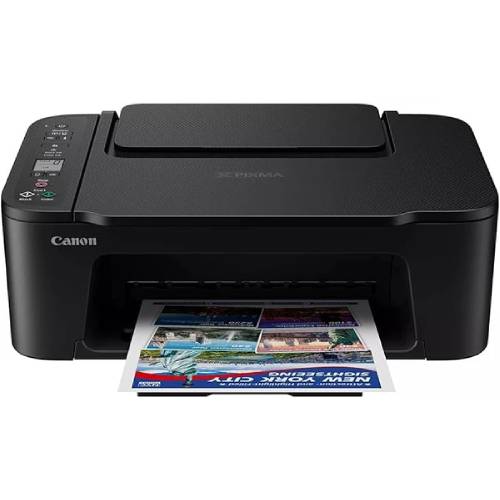
Canon PIXMA TS3640 printer
SKU.: BC4942330
✓ In stock
Canon PIXMA TS3640 All-in-One Printer
Canon PIXMA TS3640 is a compact and versatile all-in-one printer designed for home and office use. With wireless connectivity, high-quality printing, scanning, and copying functions, the TS3640 offers reliable performance at an affordable price. Its user-friendly design and advanced features make it ideal for everyday printing needs.
✅ Key Features & Benefits
- All-in-One Functionality: Print, scan, and copy with one compact device.
- Wireless Printing: Connect easily via Wi-Fi for mobile and PC printing.
- High-Quality Prints: Sharp text and vibrant photos with Canon FINE cartridges.
- Compact Design: Space-saving and stylish for home or office setups.
- Mobile Printing Support: Works with Canon PRINT app, AirPrint, and Mopria.
- Energy Efficient: Auto power on/off helps save electricity.
✅ Technical Specifications
| Specification | Details |
|---|---|
| Model | Canon PIXMA TS3640 |
| Functions | Print, Scan, Copy |
| Print Resolution | Up to 4800 x 1200 dpi |
| Print Speed | Approx. 7.7 ipm (black), 4.0 ipm (color) |
| Connectivity | Wi-Fi, USB |
| Mobile Printing | Canon PRINT app, AirPrint, Mopria |
| Paper Sizes | A4, A5, B5, Letter, Legal, Photo sizes |
| Dimensions | Approx. 435 × 316 × 145 mm |
| Weight | Approx. 4.0 kg |
✅ Ideal Uses
- Home Use: Print homework, projects, and family documents.
- Office Use: Reliable solution for everyday printing, scanning, and copying.
- Photo Printing: Print high-quality images and borderless photos.
- Wireless Printing: Print directly from smartphones and tablets.
✅ Why Choose Canon PIXMA TS3640?
- Affordable All-in-One: Great value with multi-function capability.
- Compact & Stylish: Fits easily in small spaces.
- Trusted Canon Quality: Sharp, vibrant, and reliable prints every time.
- Smart Connectivity: Simple wireless setup and mobile printing.
✅ Businessclaud Guarantee – Buy with Confidence
- 2-Year Warranty: Peace of mind on your purchase.
- Free 24-Hour Delivery: Across Kenya for quick service.
- Best Value Deal: Reliable Canon performance at an affordable price.
✅ Order Now
Get the Canon PIXMA TS3640 All-in-One Printer today from Businessclaud. Enjoy high-quality printing, scanning, and copying with free delivery and a 2-year warranty for guaranteed satisfaction.
Canon PIXMA TS3640 All-in-One Printer FAQs
1. What is the Canon PIXMA TS3640?
The Canon PIXMA TS3640 is a compact wireless all-in-one inkjet printer that offers printing, scanning, copying, and mobile cloud printing in a single device. :contentReference[oaicite:0]{index=0}
2. What are the key features of the TS3640?
Key features include:
➤ Print, scan and copy functionality, plus cloud printing via Canon PRINT app :contentReference[oaicite:1]{index=1}
➤ Wi-Fi connectivity and support for Apple AirPrint, Mopria, etc. :contentReference[oaicite:2]{index=2}
➤ Rear paper feed tray (≈ 60 sheets) and compact design suitable for home use :contentReference[oaicite:3]{index=3}
3. What is the print resolution?
It prints up to **4800 × 1200 dpi**, delivering sharp documents and vivid photos. :contentReference[oaicite:4]{index=4}
4. How fast is the printing?
Approximate speeds are:
➤ **Mono (black)**: 7.7 images per minute (ipm) :contentReference[oaicite:5]{index=5}
➤ **Colour**: 4.0 ipm :contentReference[oaicite:6]{index=6}
➤ **Photo (10×15 cm, borderless)**: around 65 seconds :contentReference[oaicite:7]{index=7}
5. Does it support borderless printing?
Yes. It supports borderless photo printing for sizes like **10×15 cm**, **13×18 cm**, and **13×13 cm**. :contentReference[oaicite:8]{index=8}
6. What cartridges does the TS3640 use?
It uses Canon FINE cartridges: PG-445 (Black) / PG-445XL, and CL-446 (Colour) / CL-446XL. :contentReference[oaicite:9]{index=9}
7. What is the yield of the cartridges?
Typical yields are approximately:
➤ Black standard: ~100 pages
➤ Black XL: ~400 pages
➤ Colour standard: ~100 pages
➤ Colour XL: ~300 pages :contentReference[oaicite:10]{index=10}
8. What paper types and sizes are supported?
It supports:
➤ Plain paper (A4, A5, B5, Letter, Legal)
➤ Photo paper (10×15 cm, 13×18 cm, 13×13 cm)
➤ Custom sizes between width 89-215.9 mm and length 127-676 mm
➤ Paper weights: plain paper 64-105 gsm; photo paper types heavier up to approx. 275 gsm for certain Canon photo papers. :contentReference[oaicite:11]{index=11}
9. What resolution does the scanner provide?
The flatbed CIS scanner offers up to **600 × 1200 dpi optical resolution** for high-quality scanning of photos and documents. :contentReference[oaicite:12]{index=12}
10. How many copies can the TS3640 make and how fast?
Copy mode: up to **20 copies** in one job; sESAT copy speed ~3.0 ipm; first copy out time ~27 seconds. :contentReference[oaicite:13]{index=13}
11. What connectivity options are available?
Connectivity includes:
➤ Wi-Fi IEEE 802.11 b/g/n (2.4 GHz)
➤ USB (Hi-Speed USB B port)
➤ Wireless printing from mobile apps (Canon PRINT, AirPrint, Mopria) :contentReference[oaicite:14]{index=14}
12. Does it support duplex (two-sided) printing?
No. It does **not have automatic duplex**; two-sided printing is **manual** only. :contentReference[oaicite:15]{index=15}
13. What are its dimensions and weight?
Approximately **435 × 327 × 145 mm** in W × D × H, and weighs around **4 kg**. :contentReference[oaicite:16]{index=16}
14. How loud is the printer when operating?
Noise level is about **48 dB(A)** during printing. :contentReference[oaicite:17]{index=17}
15. What power features does it have?
Features include Auto On/Off to save power and low standby/off power consumption. :contentReference[oaicite:18]{index=18}
16. Is the display user-friendly?
Yes. It has a **1.5″ mono LCD** screen for navigating settings, status, and selecting functions. :contentReference[oaicite:19]{index=19}
17. What operating systems are supported?
Compatible with Windows (7, 8.1, 10, 11), macOS (recent versions), and mobile platforms (iOS, Android, ChromeOS). :contentReference[oaicite:20]{index=20}
18. What paper capacity does the printer have?
Rear tray can hold up to **60 sheets** of plain paper. :contentReference[oaicite:21]{index=21}
19. Where can I buy Canon PIXMA TS3640 in Kenya?
You can purchase from Businessclaud Limited with:
➤ Free 24-hour delivery
➤ 2-year warranty on all printers
➤ Customer support via 0101001101 or [email protected]
20. Why choose the Canon PIXMA TS3640 from Businessclaud?
Because Businessclaud guarantees authentic Canon products, free same-day or next-day delivery, reliable 2-year warranty, and dedicated customer support across Kenya. Contact us at 0101001101 or [email protected].
🎯 Order Now! Click "Add to Cart" and experience the power of
Canon PIXMA TS3640 printer!
Or check out our Canon Printers
to complete your shopping experience!
| Stars | Percentage |
|---|---|